Cold email deliverability checklist for your own mailbox: 20 checks (free Excel and PDF)
20 checks for a small team sending from its own Microsoft 365 or Workspace mailbox, with the source where a rule sits behind a row. Free Excel and PDF.
Contents7 sections
Microsoft's DKIM page says: "Currently, no DKIM signing occurs for outbound mail from custom domains." Until IT turns it on, your mail leaves without your domain's signature, however long the mailbox has worked. At a few emails a day, what your buyer's filter and reader see is set in your records, your mailbox and your pace.
This is for the founder who still sells, whose IT provider runs the domain: 20 checks with an owner each, what your buyer sees when one fails, and a message for IT.
How we put this together. We read Google's, Microsoft's and Yahoo's sender rules, limits and help pages, and RFC 7208, on 14 November 2026. The checks, owners and IT message are our own.
Set up for the buyer's filter: how do you keep cold emails out of spam?
Set up what a buyer's company filter can check, in this order: your domain's records (one SPF record, DKIM signed with your domain, a DMARC record), a named mailbox that receives replies, and a few emails a day, rising slowly. Get them right before you change a word of the email.
SPF lists the servers and services allowed to send as your domain. DKIM signs each email so the receiver can check it against a public key in your DNS. DMARC tells the receiver what to do when neither passes in your domain's name, and where to send reports. In Microsoft 365, failing them earns the question mark described below; Google's sender guidelines don't cover Google Workspace inboxes.
The checklists we read, mostly from sending-tool vendors and outbound agencies, rightly put these records first, then build for several inboxes and warm-up. One person writing ten emails a day needs fewer rows, each with an owner.
The cold email deliverability checklist: 20 checks
Six phases, from day 1 to when something breaks; each rule links its source.
Download the free cold email deliverability checklist (Excel) · PDF (A4) · PDF (US Letter)
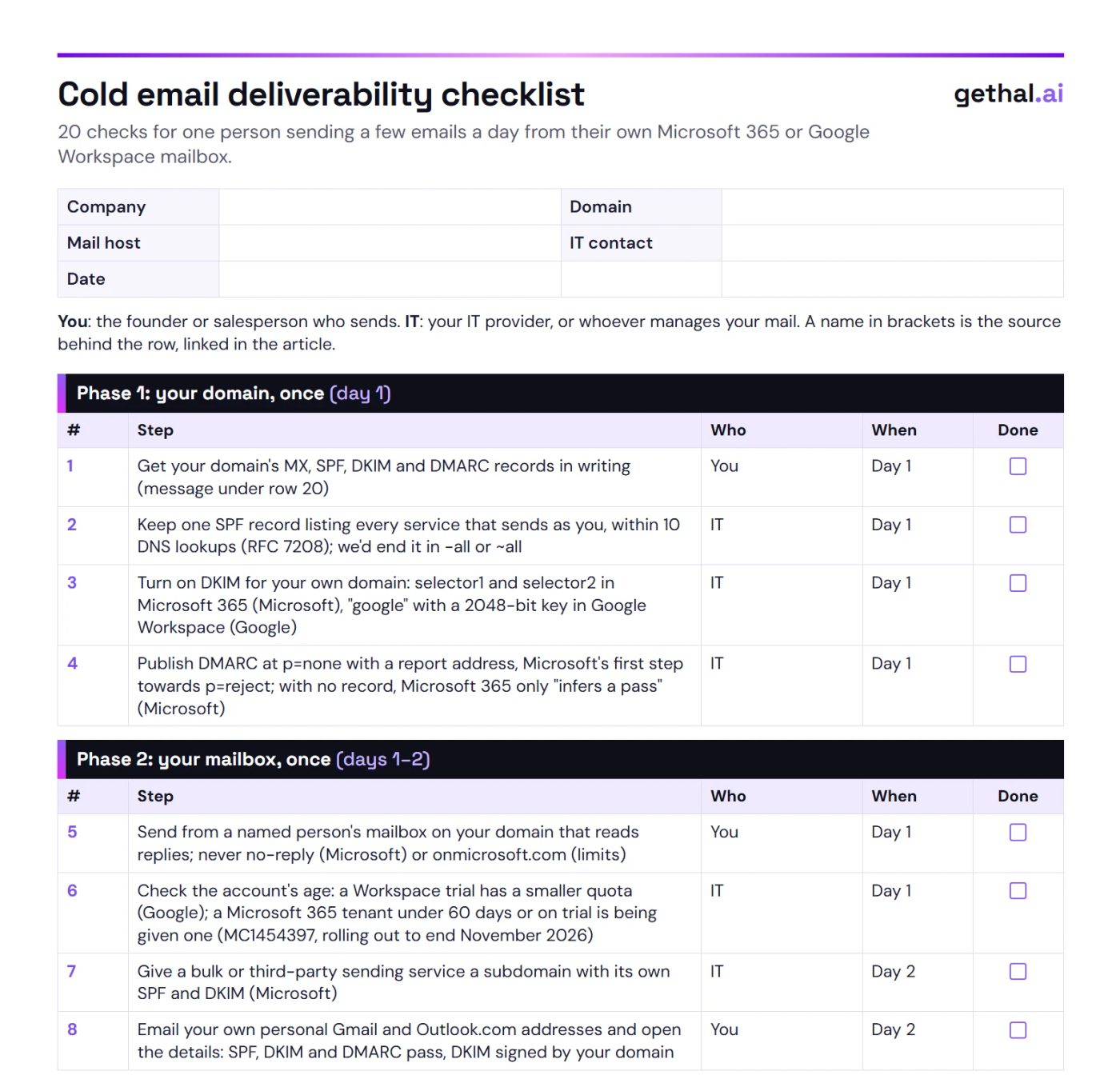
Who: "You" is the founder or salesperson who sends; "IT" is your IT provider, or whoever manages your mail.
Phase 1: your domain, once (day 1)
| # | Step | Who | When | Done |
|---|---|---|---|---|
| 1 | Get your domain's MX, SPF, DKIM and DMARC records in writing (message under row 20) | You | Day 1 | ☐ |
| 2 | Keep one SPF record listing every service that sends as you, within 10 DNS lookups (RFC 7208); we'd end it in -all or ~all | IT | Day 1 | ☐ |
| 3 | Turn on DKIM for your own domain: selector1 and selector2 in Microsoft 365 (Microsoft), "google" with a 2048-bit key in Google Workspace (Google) | IT | Day 1 | ☐ |
| 4 | Publish DMARC at p=none with a report address, Microsoft's first step towards p=reject; with no record, Microsoft 365 only "infers a pass" (Microsoft) | IT | Day 1 | ☐ |
Phase 2: your mailbox, once (days 1–2)
| # | Step | Who | When | Done |
|---|---|---|---|---|
| 5 | Send from a named person's mailbox on your domain that reads replies; never no-reply (Microsoft) or onmicrosoft.com (limits) | You | Day 1 | ☐ |
| 6 | Check the account's age: a Workspace trial has a smaller quota (Google); a Microsoft 365 tenant under 60 days or on trial is being given one (MC1454397, rolling out to end November 2026) | IT | Day 1 | ☐ |
| 7 | Give a bulk or third-party sending service a subdomain with its own SPF and DKIM (Microsoft) | IT | Day 2 | ☐ |
| 8 | Email your own personal Gmail and Outlook.com addresses and open the details: SPF, DKIM and DMARC pass, DKIM signed by your domain | You | Day 2 | ☐ |
Phase 3: your list, before each batch
| # | Step | Who | When | Done |
|---|---|---|---|---|
| 9 | Write only to companies you've checked, to one named person at each | You | Each batch | ☐ |
| 10 | Check each address, and remove any that bounced before | You | Each batch | ☐ |
| 11 | Mark buyers on personal Gmail, Outlook.com or Yahoo addresses: their providers' rules cover them | You | Each batch | ☐ |
For row 9, use our company research checklist.
Phase 4: each email
| # | Step | Who | When | Done |
|---|---|---|---|---|
| 12 | Write plain text, with your real signature and at most one link | You | Each email | ☐ |
| 13 | Leave out the open-tracking pixel: opens in classic Outlook aren't counted reliably, since it blocks pictures by default (Microsoft) | You | Each email | ☐ |
| 14 | Send to one recipient per email, written to that person | You | Each email | ☐ |
| 15 | Send a few a day, steady, rising slowly: Google advises starting with "a low sending volume" (Google) | You | Daily | ☐ |
| 16 | End with one line on how to opt out, and stop the same day someone asks | You | Each email | ☐ |
Check the email rules for each market with your own lawyer.
Phase 5: each week
| # | Step | Who | When | Done |
|---|---|---|---|---|
| 17 | Count bounces and "stop" replies; pause the list when bounces appear | You | Weekly | ☐ |
| 18 | Repeat the test in row 8 | You | Weekly | ☐ |
| 19 | Read the DMARC reports, and move to p=quarantine once only your own services appear | IT | Weekly | ☐ |
Phase 6: when something breaks
| # | Step | Who | When | Done |
|---|---|---|---|---|
| 20 | Send IT the bounce with its code, or the time sending stopped, with the message below | You, then IT | Same day | ☐ |
An example for rows 1 and 20 ("Sam" and example.com stand in for your IT contact and domain):
Subject: Four records on our domain
Hi Sam, please check four records on example.com: MX, SPF, DKIM and DMARC.
Send me what each says today, and every service that sends email as us.
Is DKIM signing with our own domain, 2048-bit where the host allows it?
If there's no DMARC record, please publish one at p=none, with reports to me.
If I've attached a bounce, what does its code mean, and what do we change?
See the outreach brief and first email HAL drafts for one company in your market. Book a demo
What does your buyer see when a check fails?
A warning above your email, before they read a word. Where the buyer's admin has turned them on, Microsoft 365 can flag a first-time sender, put a question mark on your photo when authentication fails, or add a "via" tag when another domain signed the email. Gmail shows a question mark on unauthenticated mail.
Microsoft's anti-phishing policies (updated 20 August 2026) name three signs:
- First contact tip: "You don't often get email from" and your address, for rare or new senders. Microsoft recommends turning it on; it shows where the buyer's admin has.
- Question mark: the message "doesn't pass SPF or DKIM" and doesn't pass DMARC or composite authentication.
- "via": the From domain differs from the DKIM signature's domain or the MAIL FROM address.
Do Gmail's and Outlook's 5,000-a-day rules apply to you?
They apply where your buyer reads mail in a personal inbox. Google's sender guidelines cover personal Gmail and "don't apply to messages sent to Google Workspace accounts"; Microsoft's high-volume rules cover Outlook.com. Google's rules for all senders apply at any volume, and its 5,000 a day counts mail to personal Gmail accounts from your whole primary domain, subdomains included.
| Buyer's mailbox | Rules | What applies at a few emails a day |
|---|---|---|
| Personal Gmail | Google's sender guidelines | All senders, any volume: SPF or DKIM, valid forward and reverse DNS, TLS, a spam rate below 0.3%. Above 5,000 a day, the page adds DMARC and one-click unsubscribe |
| Google Workspace | The company's own filter | Google's guidelines "don't apply" (FAQ) |
| Outlook.com, Hotmail, Live | Microsoft's high-volume rules | Requirements above 5,000 a day only: SPF, DKIM, DMARC. Microsoft said non-compliant mail would go to Junk from 5 May 2025, with rejection (550 5.7.515) on a date to be announced (post updated 30 April 2025) |
| Microsoft 365 | The company's own filter | Outside Microsoft's high-volume rules |
| Yahoo Mail | Yahoo's best practices | SPF or DKIM, a spam rate below 0.3%, valid DNS; bulk senders also DMARC and one-click unsubscribe |
How many emails can you send a day from Microsoft 365 or Google Workspace?
Far more than one person writes by hand; new and trial accounts get less.
| Limit | Microsoft 365 | Google Workspace |
|---|---|---|
| Per person, a day | 10,000 recipients, 30 messages a minute | 2,000 messages; 2,000 unique external recipients |
| New or trial account | Being cut for new and trial tenants (MC1454397, below) | Trial: 500 messages and 500 unique external recipients a day |
| Default address, or a limit reached | onmicrosoft.com: 100 external recipients a day for the whole organisation, then bounces with 550 5.7.236 | No sending for up to 24 hours |
Microsoft's message center item MC1454397 (read in a third-party archive) says trial tenants fall from 5,000 to 500 external recipients a day and new tenants get 10% then 25% of the standard quota; rollout began mid-September 2026 and is expected to finish by the end of November. The Exchange Online limits page still lists 5,000 for trials (11 November 2026). Google's sending limits were updated 10 November 2026. Microsoft cancelled a planned per-mailbox limit "indefinitely" on 6 January 2026.
Ask how HAL picks the companies worth your few emails a day. Book a demo
How the checklist changes by case
On Microsoft 365, or a new tenant
Row 3 comes first. On a tenant under 60 days old, the whole tenant shares row 6's smaller quota, newsletters and invoices included.
On Google Workspace
Google Postmaster Tools covers only mail to personal Gmail, and its dashboards "might not include all data on days when your outgoing email volume is low". Rows 8 and 17 tell you more.
With a filtering service
A filtering service that relays your outgoing mail from its own servers sends as you: list it in SPF (row 2), and check with row 8 that DKIM still passes.
When a tool sends for you: the separate-domain question
Much of the advice we read on separate domains comes from sellers of domains, inboxes and warm-up. Microsoft's DKIM page is narrower: a subdomain for email services "that aren't under your direct control (for example, bulk email services)" (row 7). Sending by hand from your own mailbox, we'd stay on your own domain. Choosing the route: agency, AI sales agent or yourself.
Three mistakes that undo the checklist
Sending a little doesn't excuse a missing record
Gmail's all-senders rules apply from the first email, and Microsoft 365's question mark follows authentication, whatever your volume.
A tool that signs with its own domain shows up as "via"
A CRM, booking or newsletter service that sends as you but signs with its own domain earns the "via" tag. Have IT give it a subdomain with its own records (row 7), then test with row 8.
The 5,000-a-day rule is the wrong yardstick at 20 a day
At 20 emails a day by hand, your yardstick is what comes back each week: bounces, "stop" replies and row 8. Gmail's all-senders rules hold at any volume (mistake 1); the 5,000 threshold, above which Google's page sets more requirements, reaches you in one case: a domain that meets it once is "permanently considered" a bulk sender (FAQ). If your newsletter shares your sales domain, ask IT.
Where HAL fits
HAL, gethal.ai's AI sales agent, does the work before rows 9 and 14. In five stages (find, research, qualify, quality control and draft) it writes, for each company, an outreach brief and a suggested first email in that market's own language. There's no send stage: you send from your own mailbox, and the replies come to you.
HAL doesn't touch your DNS records or mailbox settings and sends nothing; what you send, and its reputation, are yours. Every row stays with you and IT. To see the brief and draft for one company in your market, book a demo.
Ask in a demo what HAL hands over, and what stays with you and IT. Book a demo
For you and IT: Download all 20 checks as a free PDF (A4).
FAQ
Why are my cold emails going to spam?
Start with your own domain: a missing or broken SPF, DKIM or DMARC record, a no-reply address, or bouncing addresses. Then your pace. Test with your own Gmail and Outlook.com addresses before changing the wording.
Do I need a separate domain for cold email, or can I send from my own?
Sending a few a day by hand, use your own domain with its records in order. If a tool sends for you, Microsoft recommends a subdomain for services not under your direct control. Much of the separate-domain advice we read comes from sellers of domains.
How do I check SPF, DKIM and DMARC for my domain?
Ask whoever runs your domain for its MX, SPF, DKIM and DMARC records. Then email your own personal Gmail or Outlook.com address and open the details: all three should pass, signed with your domain.
My emails go to junk in my customer's Outlook. What do I check?
Check that DKIM is on for your domain (Microsoft 365 doesn't sign custom domains until it is), one SPF record and a DMARC record. Then send IT the bounce or a screenshot of a test.
Does a new Microsoft 365 account have lower sending limits?
Yes, or soon. Microsoft's MC1454397, expected to finish rolling out by the end of November 2026, will cut new tenants to a tenth of their daily external-recipient quota for 31 days and a quarter to day 60, and trials from 5,000 to 500 a day.
Check your four records this week
Send IT the message under row 20 on Monday, and run row 8 when they reply. Then book a demo to see what HAL would hand you for one market.
Keep reading: Between trade fairs · First cold email template · Outbound scorecard template
What changed: nothing yet